📌 Introduction
Struggling to link bank account to Cash App? You’re not alone.
Thousands of users face errors, failed verification, or confusing steps every day. The good news? You can fix it in just 2 minutes using the exact method in this guide.
In this updated 2026 guide, you’ll learn:
✔ Fastest way to link your bank account
✔ Common mistakes that block verification
✔ Secret tips to avoid transaction issues
If you’re using Cash App, Link Bank Account to Cash App is one of the most important steps to unlock its full potential. Whether you want to send money, receive payments, withdraw funds, or invest, connecting your bank account ensures smooth and secure transactions.
✅ Quick Answer
To link your bank account to Cash App:
- Open Cash App
- Tap Banking tab
- Select “Link Bank”
- Enter routing & account number
- Verify your account
⏱ Takes less than 2 minutes
Want to earn money online using apps like Cash App? Check our complete guide on making $1000/month online.
- 📌 Introduction
- 🔥 What is Cash App & Why Link a Bank Account?
- 🧾 Requirements Before Linking Bank Account
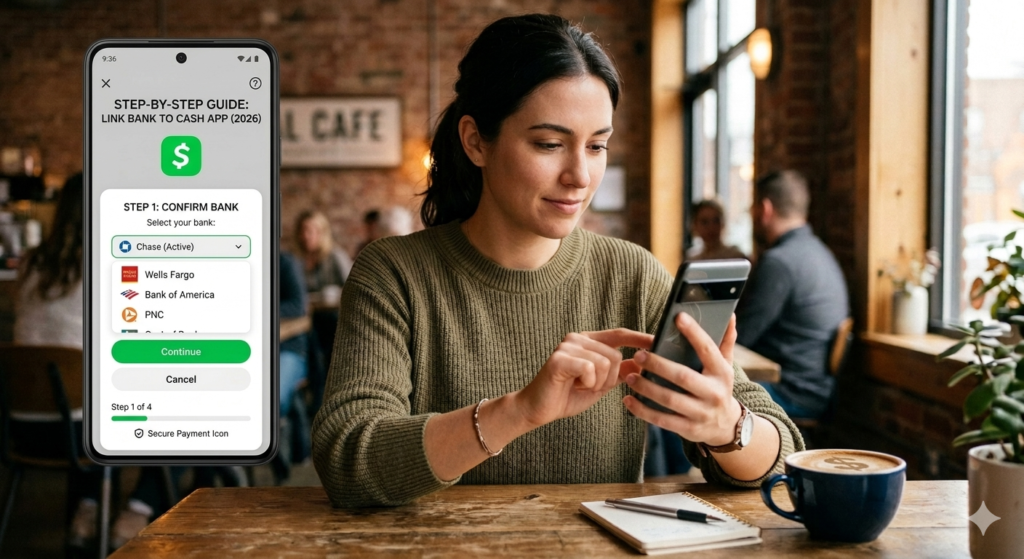
- 🚀 Step-by-Step Guide: Link Bank Account to Cash App 2026
- 🔐 Is It Safe to Link Your Bank Account?
- 🔐Keeping Your Linked Bank Account Secure
- 💸 What You Can Do After Linking Bank Account
- ⚡ Cash App Fees (Important)
- 🔄 How to Change or Remove Bank Account
- 🌍 Can You Use Cash App Outside USA?
- 📊 Pro Tips to Use Cash App Efficiently
- 🎯 Conclusion
- Frequently Asked Questions
🔥 What is Cash App & Why Link a Bank Account?
Cash App is a mobile payment service developed by Block, Inc. (formerly Square) that lets you send, receive, and manage money directly from your smartphone. Think of it as your digital wallet — simple, fast, and designed for everyday financial tasks.
With Cash App, you can:
- Send or receive money instantly from friends, family, or businesses
- Pay bills and make purchases online or in stores using your Cash App Card
- Invest in stocks or Bitcoin directly within the app
- Receive your paycheck via direct deposit, often up to two days early
So, Why Link a Bank Account?
While Cash App gives you a free balance to work with, linking your bank account unlocks its full potential. Here’s why it matters:
1. Add & Withdraw Funds Freely Without a linked bank, your Cash App balance is essentially a closed loop. Connecting your bank lets you load money in when you need it and cash out your balance whenever you want.
2. Higher Sending & Receiving Limits Unverified accounts face strict limits. Linking a bank account (along with identity verification) helps raise those limits significantly — important if you’re making larger transfers.
3. Instant or Standard Transfers Once your bank is linked, you can move money between Cash App and your account — either instantly (for a small fee) or within 1–3 business days for free.
4. Seamless Bill Payments & Shopping A linked bank ensures you always have a funding source ready, so you’re never caught short when making a payment or purchase.
5. Direct Deposit Setup To receive your paycheck directly into Cash App, a verified bank connection is often part of the setup process.
In short, Cash App is useful on its own — but linking your bank account transforms it from a simple peer-to-peer tool into a fully functional digital banking experience.
💡Cash App is a popular financial app in the USA that allows users to:
- Send & receive money instantly
- Withdraw funds to a bank
- Invest in stocks & Bitcoin
- Get a Cash Card (debit card)
🧾 Requirements Before Linking Bank Account
Before you begin, make sure you have:
- ✔️ Active Cash App account
- ✔️ Valid U.S. bank account
- ✔️ Debit card (recommended)
- ✔️ Stable internet connection
🚀 Step-by-Step Guide: Link Bank Account to Cash App 2026
Follow these detailed steps to successfully connect your bank account to Cash App and unlock its full features.
Step 1: Download & Open Cash App
If you haven’t already, download Cash App from the Apple App Store or Google Play Store. Once installed, open the app and sign in using your registered mobile number or email address. If you’re a new user, complete the quick sign-up process first.
Step 2: Go to Your Profile
Once you’re on the home screen, look for the circular profile icon in the top-right corner of the screen and tap on it. This takes you to your account settings, where you can manage everything related to your Cash App account — including payment methods.
Step 3: Navigate to “Linked Banks”
Inside your profile or account settings, scroll down until you find the option labeled “Linked Banks” or “Link Bank.” Tap on it to begin the bank linking process. This is the dedicated section where all your external funding sources are managed.
Step 4: Choose How to Link Your Bank
Cash App gives you two ways to connect your bank account:
Option A — Link via Plaid (Recommended)
Plaid is a secure third-party financial connector that Cash App uses to verify your bank instantly. Here’s how it works:
- Tap “Link with Plaid” when prompted
- Search for your bank by name from the list
- Enter your online banking username and password
- Plaid will verify your credentials securely and link the account within seconds
This method is fast, widely supported, and doesn’t require you to dig up any account numbers.
Option B — Link Manually
If your bank isn’t supported by Plaid or you prefer not to use it, you can link manually:
- Select “Link Manually” or “Link with Account Number”
- Enter your bank’s routing number (the 9-digit number identifying your bank)
- Enter your account number (found on your checks or bank statement)
- Double-check both numbers carefully before proceeding
With manual linking, Cash App may send two small micro-deposits to your bank account within 1–3 business days. You’ll need to return to the app and confirm the exact amounts to verify and activate the connection.
Step 5: Confirm Your Bank Details
After entering your information through either method, review everything carefully on the confirmation screen. Make sure:
- The bank name displayed matches your actual bank
- The account type (checking or savings) is correct
- There are no typos in any numbers entered manually
Tap “Confirm” or “Link Bank” to proceed.
Step 6: Verify Your Identity (If Prompted)
For security purposes, Cash App may ask you to verify your identity before the bank link is fully activated. This can include:
- Entering the last four digits of your Social Security Number (SSN)
- Providing your full legal name and date of birth
- Confirming your billing address
This is a standard security measure to protect your account and comply with financial regulations. Your information is encrypted and handled securely.
Step 7: Set It as Your Default Funding Source (Optional)
Once your bank is successfully linked, you’ll have the option to set it as your default funding source. This means whenever you make a payment or transfer on Cash App, it will automatically draw from your linked bank account rather than just your Cash App balance.
To do this:
- Go back to Profile → Linked Banks
- Tap on your newly linked account
- Select “Set as Default”
Step 8: You’re All Set!
A confirmation message or green checkmark will appear once your bank has been successfully linked. You can now:
- Add money to your Cash App balance from your bank
- Transfer your Cash App balance directly to your bank account
- Make payments using your bank as a funding source
Quick Troubleshooting Tips
| Issue | What to Do |
|---|---|
| Bank not found in Plaid | Try linking manually with routing & account number |
| Micro-deposits not received | Wait 2–3 business days and check your bank statement |
| Link failed or error message | Double-check your login credentials or account numbers |
| Identity verification failed | Ensure your personal details match your bank records exactly |
Linking your bank account takes just a few minutes, and once it’s done, you’ll have a much more flexible and powerful Cash App experience at your fingertips.
🔐 Is It Safe to Link Your Bank Account?
Yes — Cash App uses:
- 🔒 Encryption technology
- 🛡️ Fraud detection systems
- 🔑 Secure login authentication
💡 Safety Tips:
- Never share OTP or PIN
- Enable 2-factor authentication
- Use a strong password
🚀 Start Earning Online (USA Users)
Once your bank account is linked to Cash App, you can receive payments instantly from remote jobs.
👉 Don’t miss this: I Found 12 Remote Jobs in USA That Pay $5000/Month Without Degree
This guide reveals legit, beginner-friendly jobs you can start today.
🔐Keeping Your Linked Bank Account Secure
Linking your bank account introduces a greater level of financial access, which means security becomes more important than ever. Follow these best practices to protect yourself:
Enable Two-Factor Authentication
Cash App offers an optional security lock that requires Touch ID, Face ID, or a PIN every time you open the app or make a payment. Turn this on immediately under Profile > Privacy & Security > Security Lock. This single step dramatically reduces the risk of unauthorized access to your account.
Use a Strong, Unique Password
Your Cash App login is tied to your email or phone number. Make sure the email account associated with Cash App uses a strong, unique password that you do not use for any other service. Consider using a password manager to generate and store complex passwords securely.
Never Share Your Account Credentials
Cash App will never ask for your PIN, password, or full Social Security Number via text message, email, or phone call. If anyone contacts you claiming to be from Cash App Support and asks for this information, it is a scam. Report it immediately and do not share anything.
Review Your Transaction History Regularly
Make it a habit to check your Cash App transaction history at least once a week. Look for any payments or transfers you do not recognize. If you spot anything suspicious, report it immediately through the app and contact your bank.
Be Cautious on Public Wi-Fi
Avoid linking your bank account or making transfers while connected to public Wi-Fi networks. These connections are often unsecured and can expose your data to third parties. If you must use public Wi-Fi, consider enabling a VPN on your device first.
💸 What You Can Do After Linking Bank Account
Once connected, you can:
- Transfer money to bank instantly
- Add funds to Cash App wallet
- Set up direct deposits
- Pay bills easily
⚡ Cash App Fees (Important)
| Service | Fee |
| Standard Transfer | Free (1–3 days) |
| Instant Transfer | 0.5% – 1.75% |
| Sending Money | Free |
🔄 How to Change or Remove Bank Account
Steps:
- Go to Banking tab
- Select linked bank
- Tap Remove Bank
- Add a new one
🌍 Can You Use Cash App Outside USA?
Currently, Cash App works mainly in:
- 🇺🇸 United States
- 🇬🇧 United Kingdom
📊 Pro Tips to Use Cash App Efficiently
- Link both bank + debit card
- Use instant transfer only when needed
- Enable notifications
- Track transactions regularly
🎯 Conclusion
Linking your bank account to Cash App is one of the most straightforward yet impactful things you can do to elevate your experience on the platform. What starts as a basic peer-to-peer payment app transforms into a versatile financial tool the moment your bank account is connected. You gain the freedom to move money on your own terms, access elevated transaction limits, use direct deposit, and manage your finances with ease.
The process itself takes just a few minutes — whether you link instantly through Plaid or take the manual route with your routing and account numbers. And with the security features Cash App provides, along with the best practices outlined in this guide, you can link with confidence knowing your financial information is protected.
So if you have been using Cash App without a linked bank account, there is no better time than now. Follow the steps in this guide, get connected, and start experiencing everything Cash App was designed to offer.
By following this step-by-step guide, you can easily connect your bank account and start using Cash App like a pro 💸
Frequently Asked Questions
Is it safe to link my bank account to Cash App?
Yes. Cash App uses bank-level 256-bit encryption to protect your financial data. It is also PCI-DSS compliant, meaning it meets the highest industry standards for payment security. Linking via Plaid adds an extra layer of protection by ensuring your login credentials are never stored directly by Cash App.
Can I link a savings account instead of a checking account?
Yes, Cash App supports both checking and savings accounts. However, a checking account is generally recommended as it tends to have fewer restrictions on electronic transfers compared to savings accounts, which may have monthly transaction limits under federal regulations.
Can I link more than one bank account?
Cash App allows you to link multiple bank accounts, though you can only designate one as the default funding source at a time. You can switch between linked accounts as needed from the Linked Banks section in your profile settings.
How long does it take to link a bank account?
Linking via Plaid is typically instant — the process takes under a minute. Manual linking requires two to three business days for micro-deposit verification before the connection is fully active.
What if I want to remove or change my linked bank?
You can unlink a bank account at any time by going to Profile > Linked Banks, selecting the account, and choosing Remove Bank. You can then add a new bank account following the same steps outlined in this guide.
Does linking a bank account affect my credit score?
No. Linking a bank account to Cash App does not involve a credit inquiry of any kind and has absolutely no impact on your credit score.
How long does it take to link a bank?
👉 Instant (if login method) or 1–2 days (manual verification).
2 thoughts on “How to Link Bank Account to Cash App (2026) – Works in 2 Minutes ⚡”